Class11-Understand Operating System
Unit 1 – Computer Organisation
Operating System
Learning Objectives
After studying this topic, students will be able to:
Understand the meaning of an Operating System.
Explain the need for an Operating System.
Identify the major functions of an Operating System.
Understand different types of Operating Systems.
Differentiate between various types of Operating Systems.
Identify common Operating Systems used in computers and mobile devices.
Introduction to Operating System
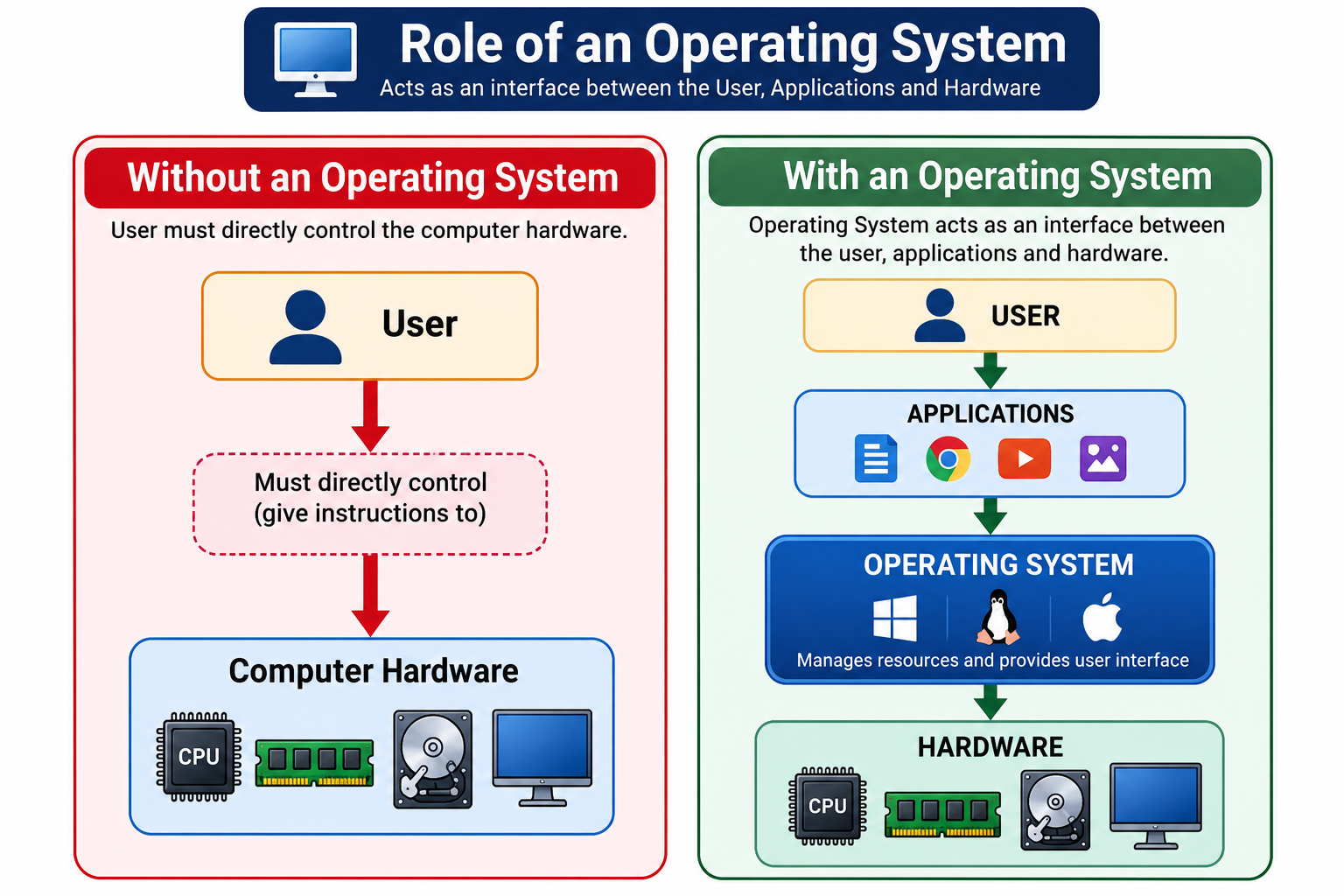
An Operating System (OS) is system software that acts as an interface between the user and computer hardware.
It manages the computer's hardware and software resources and provides an environment in which application programs can run.
Simple Definition
An Operating System is system software that manages computer hardware and software resources and provides services to application programs and users.
Examples of Operating Systems include:
Microsoft Windows
Linux
macOS
Android
iOS
ChromeOS
Why Do We Need an Operating System?
A computer consists of many hardware components such as:
CPU
RAM
Hard disk/SSD
Keyboard
Mouse
Monitor
Printer
Network devices
Managing all these components directly would be very difficult for a normal user.
The Operating System provides a convenient way for users and applications to communicate with the hardware.
Examples of Operating Systems
Operating System | Commonly Used On |
|---|---|
Windows | Desktop PCs, laptops |
Linux | PCs, servers, embedded systems |
macOS | Apple Mac computers |
Android | Smartphones, tablets, TVs |
iOS | iPhones |
ChromeOS | Chromebooks |
Different Operating Systems are designed for different types of devices and requirements.
Main Objectives of an Operating System
The major objectives of an Operating System are:
Convenience – Make computers easier to use.
Resource Management – Manage CPU, memory, storage and I/O devices.
Efficiency – Use computer resources efficiently.
Security – Protect data and system resources.
Error Management – Detect and handle various system errors.
Program Execution – Provide an environment for programs to run.
Functions of an Operating System
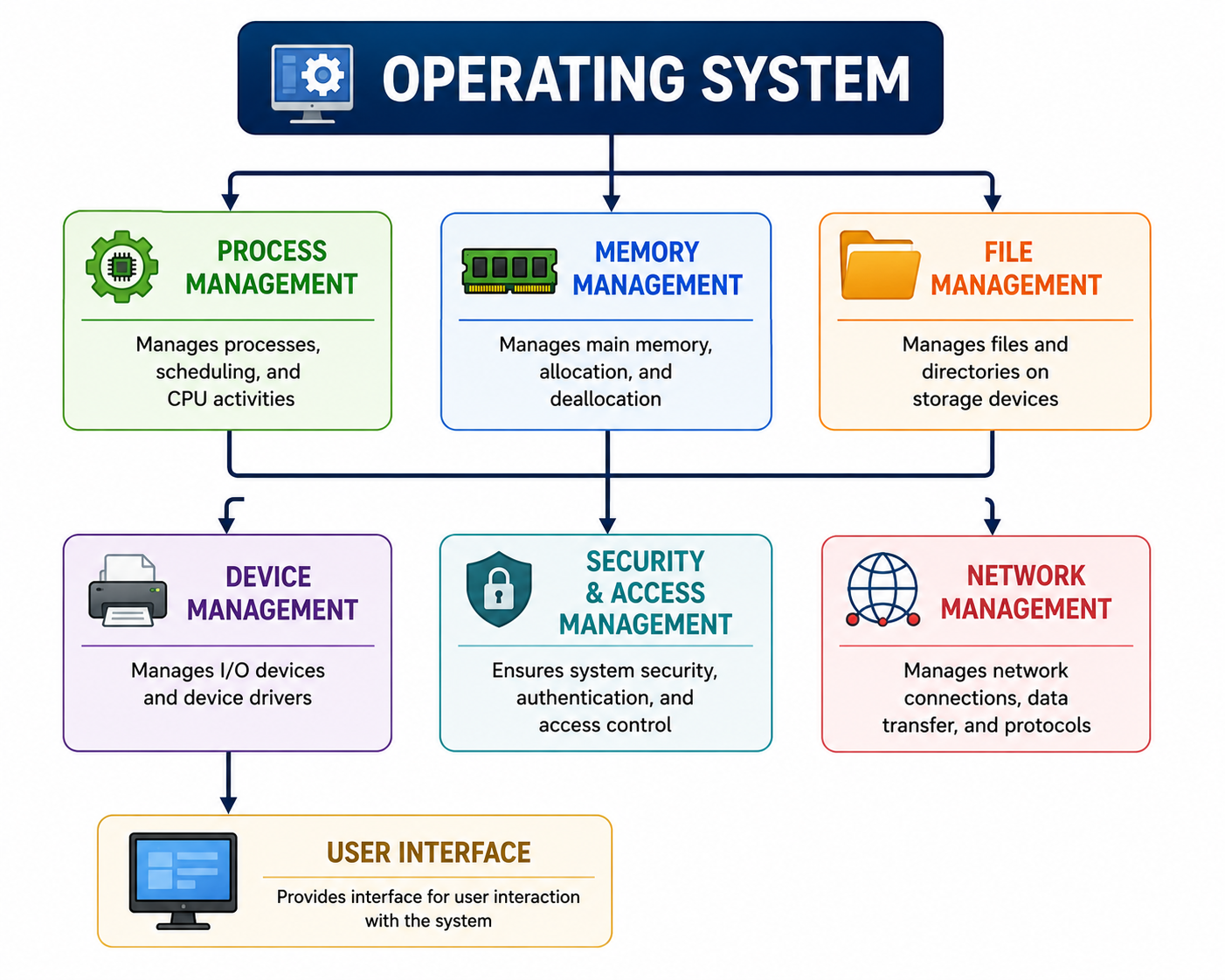
An Operating System performs many important functions.
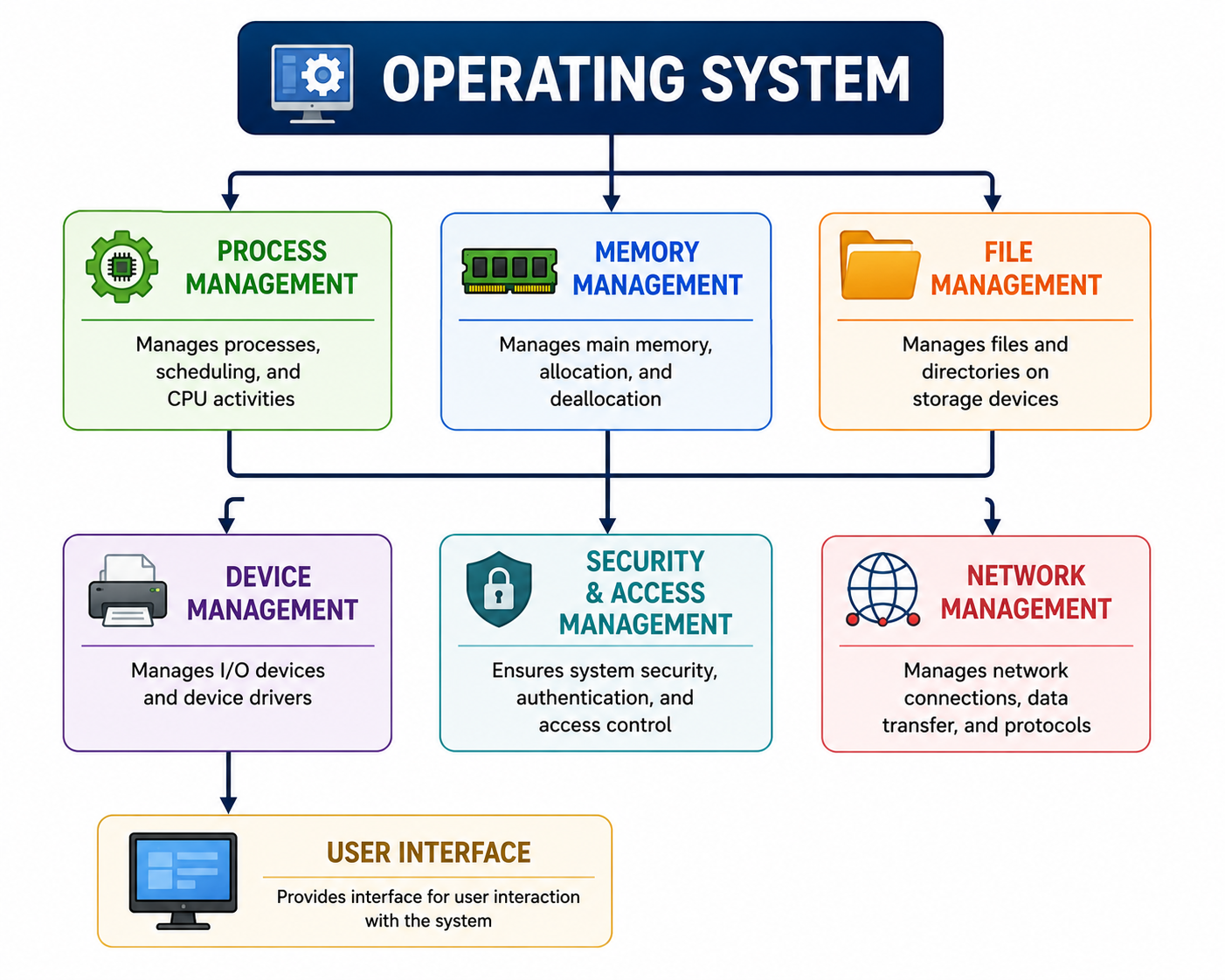
The major functions include:
Process Management
Memory Management
File Management
Device Management
User Interface
Security and Access Control
Resource Management
Error Detection and Handling
Storage Management
Networking
System Performance Monitoring
1. Process Management
A process is a program that is currently being executed.
The Operating System manages processes and decides how CPU time is allocated among them.
Example
Suppose a user is simultaneously:
Playing music
Browsing the Internet
Editing a document
The Operating System manages the CPU and other resources required by these applications.
Functions of Process Management
Creating processes
Scheduling processes
Allocating CPU time
Managing process execution
Terminating processes
Coordinating processes
2. Memory Management
The Operating System manages the computer's main memory, particularly RAM.
It keeps track of:
Which memory locations are being used.
Which programs are using memory.
How much memory is available.
When memory should be allocated or released.
Example
When a user opens a web browser, the OS allocates RAM to the browser and its processes.
When the application is closed, the OS can reclaim that memory.
3. File Management
The Operating System manages files and folders stored on storage devices.
It allows users to:
Create files
Open files
Rename files
Copy files
Move files
Delete files
Organise files into folders
Control access to files
Example
When you create:
Class11_IT_Notes.pdf
the Operating System manages where and how the file is stored.
4. Device Management
The Operating System manages hardware devices connected to the computer.
Examples:
Keyboard
Mouse
Printer
Scanner
Monitor
Speakers
USB devices
The OS communicates with many hardware devices using device drivers.
Example
When a printer is connected, the Operating System uses appropriate software/driver support to communicate with the printer.
5. User Interface
The Operating System provides an interface through which users interact with the computer.
Two major forms are:
Graphical User Interface (GUI)
Users interact using:
Windows
Icons
Menus
Buttons
Pointers
Examples: Windows, macOS and many Linux desktop environments.
Command-Line Interface (CLI)
Users type commands to interact with the computer.
Example:
C:\> diror in a Unix/Linux shell:
$ ls6. Security and Access Control
The Operating System helps protect the computer and its data.
Security functions may include:
User accounts
Passwords
Permissions
Access control
Authentication
Process isolation
Security policies
Example
A school computer may have separate user accounts for:
Administrator
Teacher
Student
Each account can be given different permissions.
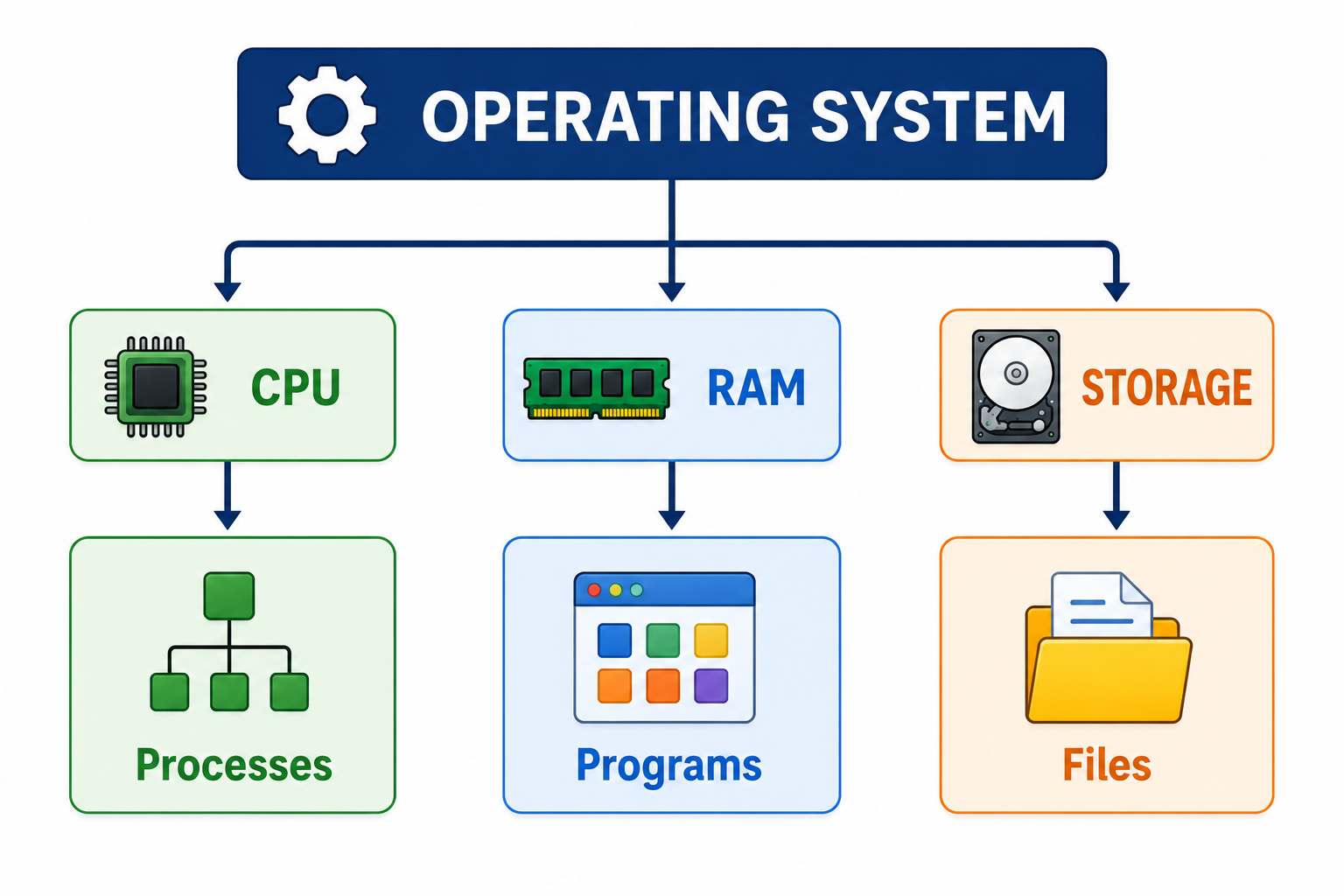
7. Resource Management
A computer has limited resources such as:
CPU time
RAM
Storage
Network bandwidth
Input/output devices
The Operating System manages these resources and allocates them to programs as required.
8. Error Detection and Handling
The Operating System monitors the computer system and helps detect and handle errors.
Examples:
Application crashes
Storage errors
Invalid operations
Device problems
Memory-related problems
The OS may display an error message or take corrective action where possible.
9. Storage Management
The Operating System manages data stored on storage devices.
It keeps track of:
Files
Directories/folders
Available storage space
Storage allocation
File permissions
File systems
Examples of file systems include:
NTFS
FAT32
exFAT
ext4
APFS
10. Networking
Modern Operating Systems provide networking capabilities.
They allow computers and applications to communicate over networks.
Networking functions include:
Managing network connections
Supporting network protocols
Managing network devices
Sharing resources
Supporting Internet access
11. System Performance Monitoring
The Operating System can monitor system resources such as:
CPU usage
Memory usage
Storage usage
Network activity
Running processes
For example, Task Manager in Windows allows users to view running processes and resource usage.
Types of Operating Systems
Operating Systems can be classified according to how they manage users, processes, tasks and resources.
Important types include:
Single-User Operating System
Multi-User Operating System
Single-Tasking Operating System
Multitasking Operating System
Batch Operating System
Multiprocessing Operating System
Multithreading Operating System
Real-Time Operating System
Distributed Operating System
Network Operating System
Embedded Operating System
Mobile Operating System
1. Single-User Operating System
A Single-User Operating System is designed primarily for one user at a time.
The system may still support multiple applications depending on the OS.
Example
Many personal computer operating systems are commonly used in a single-user setting.
2. Multi-User Operating System
A Multi-User Operating System allows multiple users to use computer resources, either simultaneously or through managed sessions.
The OS manages resources and access rights for different users.
Examples
Linux/Unix server systems
Windows Server
Uses
Servers
Universities
Organisations
Data centres
3. Single-Tasking Operating System
A Single-Tasking Operating System is designed to execute one main task at a time.
An early example is MS-DOS, which was primarily designed for command-line interaction and single-tasking use.
4. Multitasking Operating System
A Multitasking Operating System allows multiple processes or applications to make progress during the same period.
For example, a user can:
Listen to music
Browse the Internet
Edit a document
at the same time.
Modern desktop and mobile Operating Systems support multitasking.
5. Batch Operating System
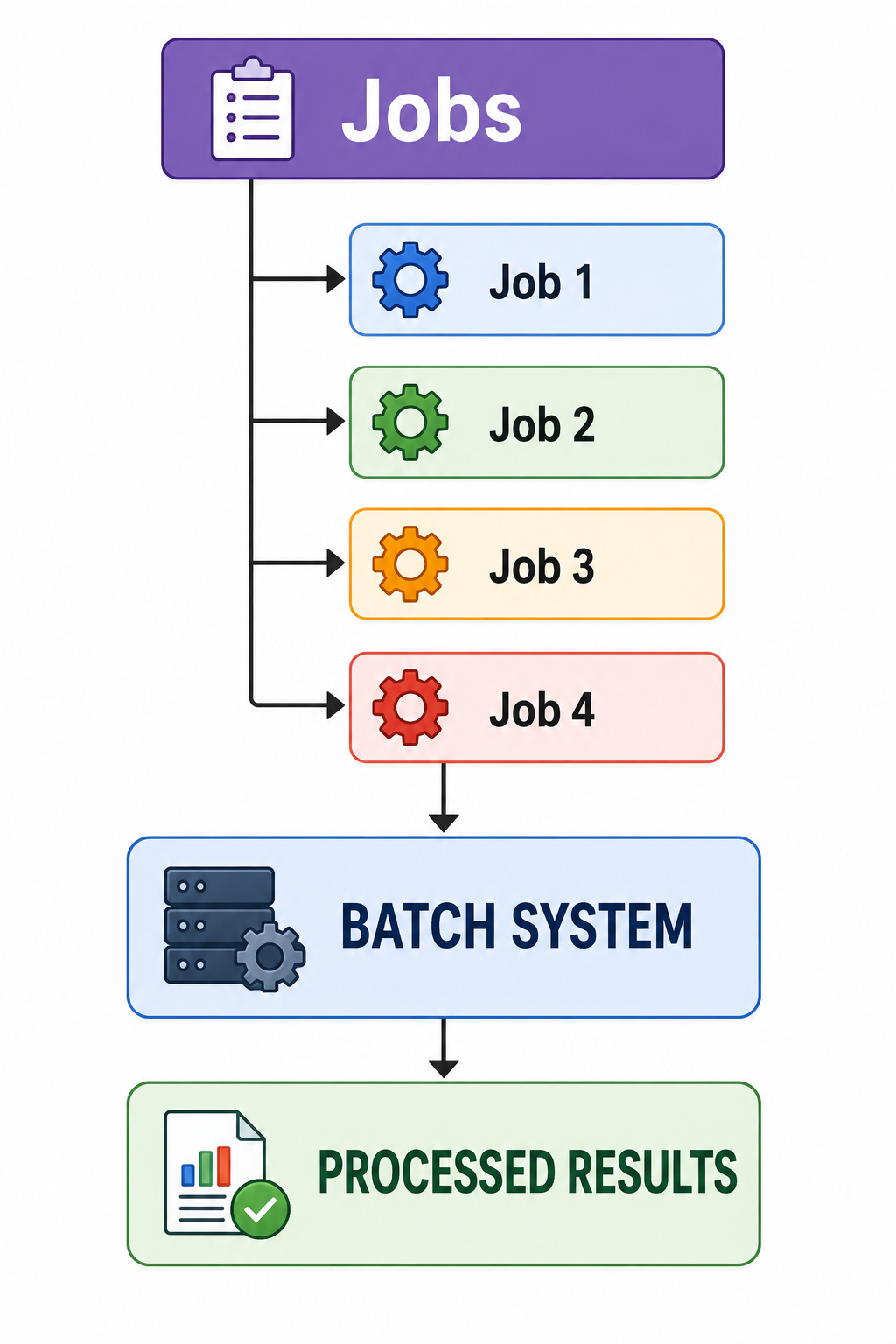
A Batch Operating System processes jobs in groups or batches without requiring continuous interaction from the user during processing.
Basic Working
Characteristics
Jobs are collected.
Similar jobs may be grouped.
Jobs are processed automatically.
User interaction during execution is limited.
Example Uses
Batch processing is useful for:
Payroll processing
Billing
Large data processing
Generating reports
6. Multiprocessing Operating System
A Multiprocessing Operating System supports systems with multiple processing units or CPU cores and can schedule work across them.
Modern computers commonly have processors with multiple cores.
Advantages
Better performance
Parallel execution
Improved resource utilisation
Better support for demanding workloads
7. Multithreading Operating System
A thread is a unit of execution within a process.
A multithreaded Operating System supports programs that contain multiple threads running concurrently.
Example
A web browser may use different threads for:
User interface
Network operations
Page rendering
Background tasks
Multithreading can improve responsiveness and resource utilisation.
8. Real-Time Operating System (RTOS)
A Real-Time Operating System is designed to respond to events within specified timing constraints.
The key feature is predictable response time.
RTOSs are commonly used where timing is critical.
Examples of Applications
Industrial control systems
Robotics
Medical devices
Automotive systems
Aircraft systems
Embedded controllers
Important Point
Real-time does not simply mean "very fast."
It means that the system is designed to provide responses within required timing constraints.
9. Distributed Operating System
A Distributed Operating System manages resources across multiple connected computers and can provide users with a unified system view.
The computers communicate and cooperate to perform tasks.
Concept
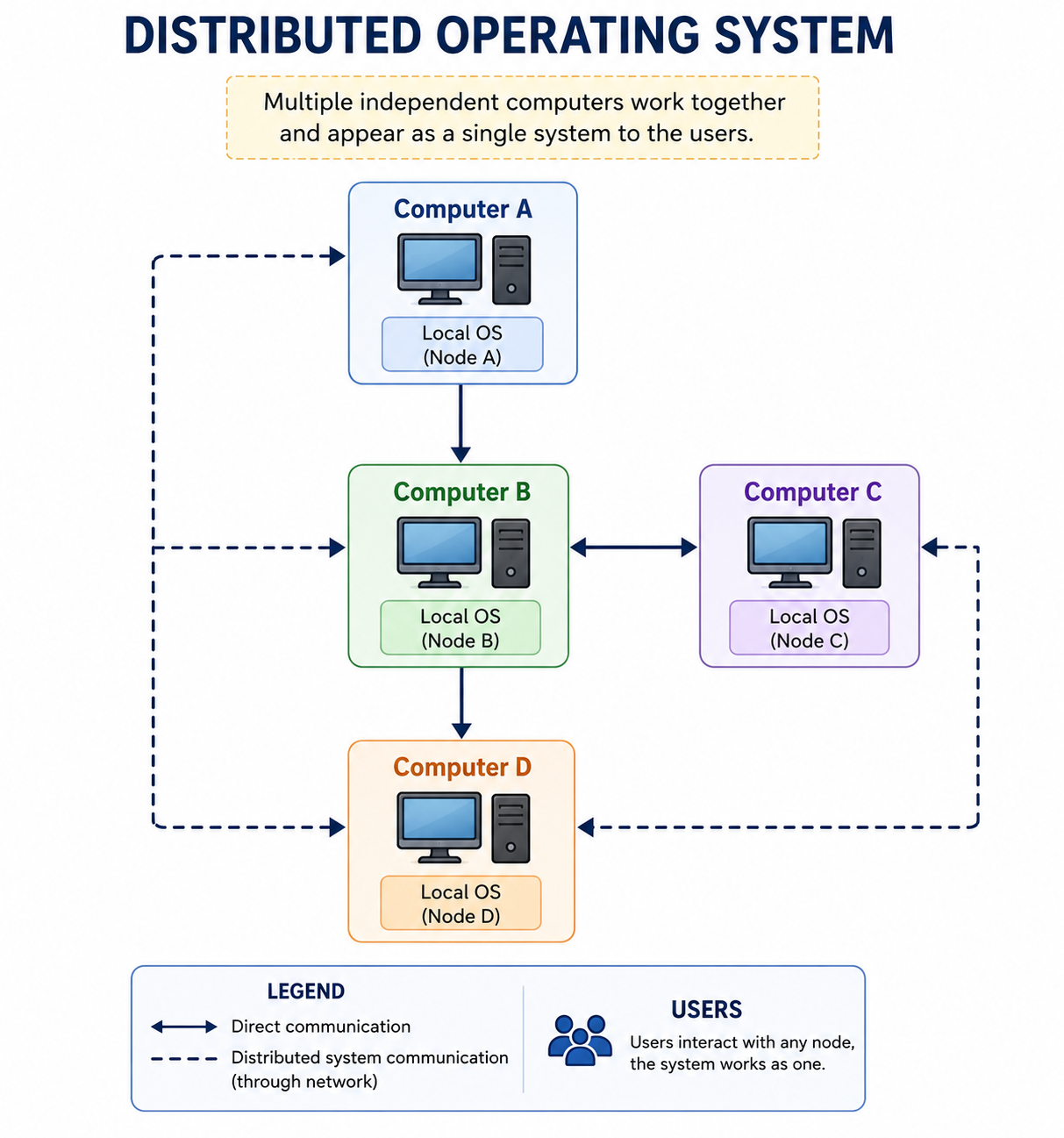
The resources of multiple computers can cooperate as part of a distributed system.
10. Network Operating System
A Network Operating System (NOS) is designed to provide and manage network-related services and resources.
It may provide:
User management
File sharing
Printer sharing
Network security
Centralised resource management
Examples include server-oriented operating systems such as:
Windows Server
Linux server distributions
11. Embedded Operating System
An Embedded Operating System is designed for specialised devices with dedicated functions.
Examples include:
Smart TVs
Routers
Printers
Washing machines
IoT devices
Industrial controllers
Automotive systems
Embedded systems generally have specific hardware and software requirements.
12. Mobile Operating System
A Mobile Operating System is designed specifically for mobile devices such as smartphones and tablets.
Major examples include:
Android
Developed around the Android platform and widely used on smartphones, tablets, TVs and other devices.
iOS
Apple's mobile operating system used on iPhone devices.
Mobile Operating Systems provide features such as:
Touch interface
Mobile networking
App management
Camera support
Location services
Power management
Security
Graphical User Interface vs Command-Line Interface
Feature | GUI | CLI |
|---|---|---|
Interaction | Graphics | Text commands |
Ease of use | Generally easier for beginners | Requires knowledge of commands |
Input | Mouse, keyboard, touch | Mainly keyboard |
Visual elements | Windows, icons, menus | Text-based |
Examples | Windows desktop, macOS desktop | Command Prompt, PowerShell, Unix/Linux shell |
Automation | Possible | Very powerful for scripting |
Both interfaces can be useful depending on the task.
Comparison of Operating System Types
Type | Main Feature | Typical Use |
|---|---|---|
Single-User | Designed for one user at a time | Personal computers |
Multi-User | Supports multiple users | Servers |
Single-Tasking | One main task at a time | Early/simple systems |
Multitasking | Multiple processes can make progress | Modern PCs/mobile |
Batch | Processes jobs in groups | Payroll, billing |
Multiprocessing | Uses multiple processing units/cores | Modern computers/servers |
Multithreading | Supports multiple threads | Modern applications |
Real-Time | Predictable timing constraints | Robotics, control systems |
Distributed | Coordinates multiple computers | Distributed environments |
Network | Provides network services/resources | Servers |
Embedded | Designed for specialised devices | IoT, appliances |
Mobile | Designed for mobile devices | Smartphones/tablets |
Difference Between Windows, Linux, macOS, Android and iOS
Feature | Windows | Linux | macOS | Android | iOS |
|---|---|---|---|---|---|
Developer/Organisation | Microsoft | Open-source community and organisations | Apple | Google-led Android ecosystem | Apple |
Main Devices | PCs/Laptops | PCs, Servers, Embedded | Mac computers | Smartphones/Tablets and other devices | iPhones |
Source Model | Proprietary | Open-source kernel and many open-source components | Proprietary OS with open-source components | Open-source platform components with proprietary ecosystem components | Proprietary |
Interface | Mainly GUI with CLI tools | GUI + CLI | GUI + CLI | Touch-based GUI | Touch-based GUI |
Common Strength | Desktop software compatibility | Flexibility and server use | Apple hardware integration | Wide device variety | Tight Apple ecosystem integration |
1. Windows
Windows is a family of Operating Systems developed by Microsoft.
It is widely used on personal computers.
Features
Graphical user interface
Multitasking
Hardware and peripheral support
Networking
Security features
Wide software compatibility
Common Uses
Education
Offices
Programming
Business
Gaming
Home computing
2. Linux
Linux is based on the Linux kernel and is widely used in servers, desktops, embedded systems and many other environments.
Popular Linux distributions include:
Ubuntu
Fedora
Debian
Linux Mint
Features
Open-source ecosystem
Highly configurable
Strong server presence
Powerful command-line tools
Supports multiple users and multitasking
3. macOS
macOS is the Operating System developed by Apple for Mac computers.
Features
Graphical interface
Strong integration with Apple hardware
Multitasking
Security features
Unix-based foundation
Integration with other Apple services and devices
4. Android
Android is a mobile operating system platform based on the Linux kernel and maintained by Google with contributions from the broader Android ecosystem.
It is used on many smartphones and tablets.
Features
Touch interface
App ecosystem
Notifications
Mobile connectivity
Location services
Camera and multimedia support
5. iOS
iOS is Apple's mobile Operating System for iPhone.
Features
Touch-based interface
Strong hardware/software integration
App ecosystem
Security and privacy features
Mobile networking
Integration with Apple services
Operating System as a Resource Manager
One of the most important concepts is:
The Operating System acts as a resource manager.
It manages:
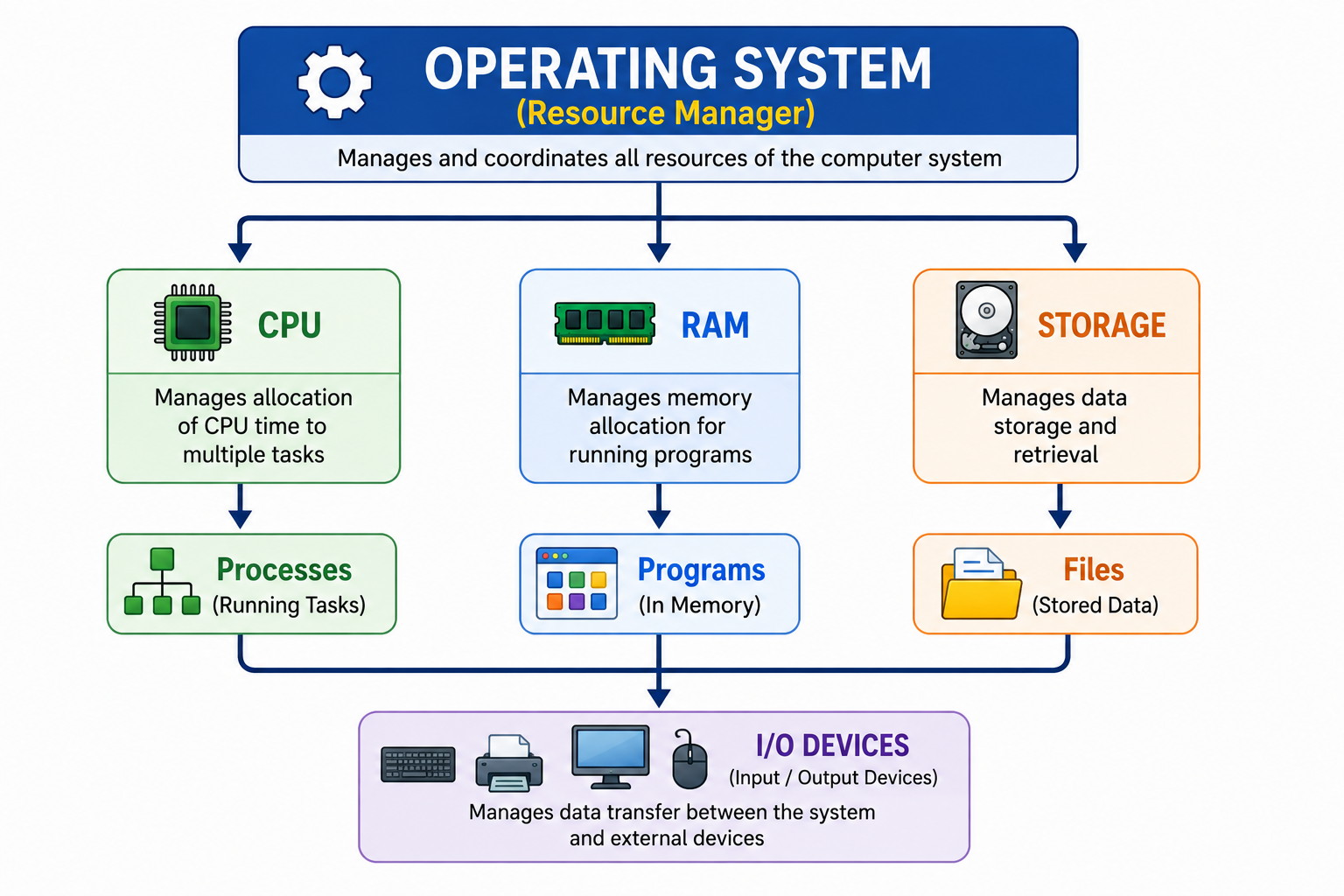
The OS decides how available resources are allocated among competing programs.
Operating System and Application Software
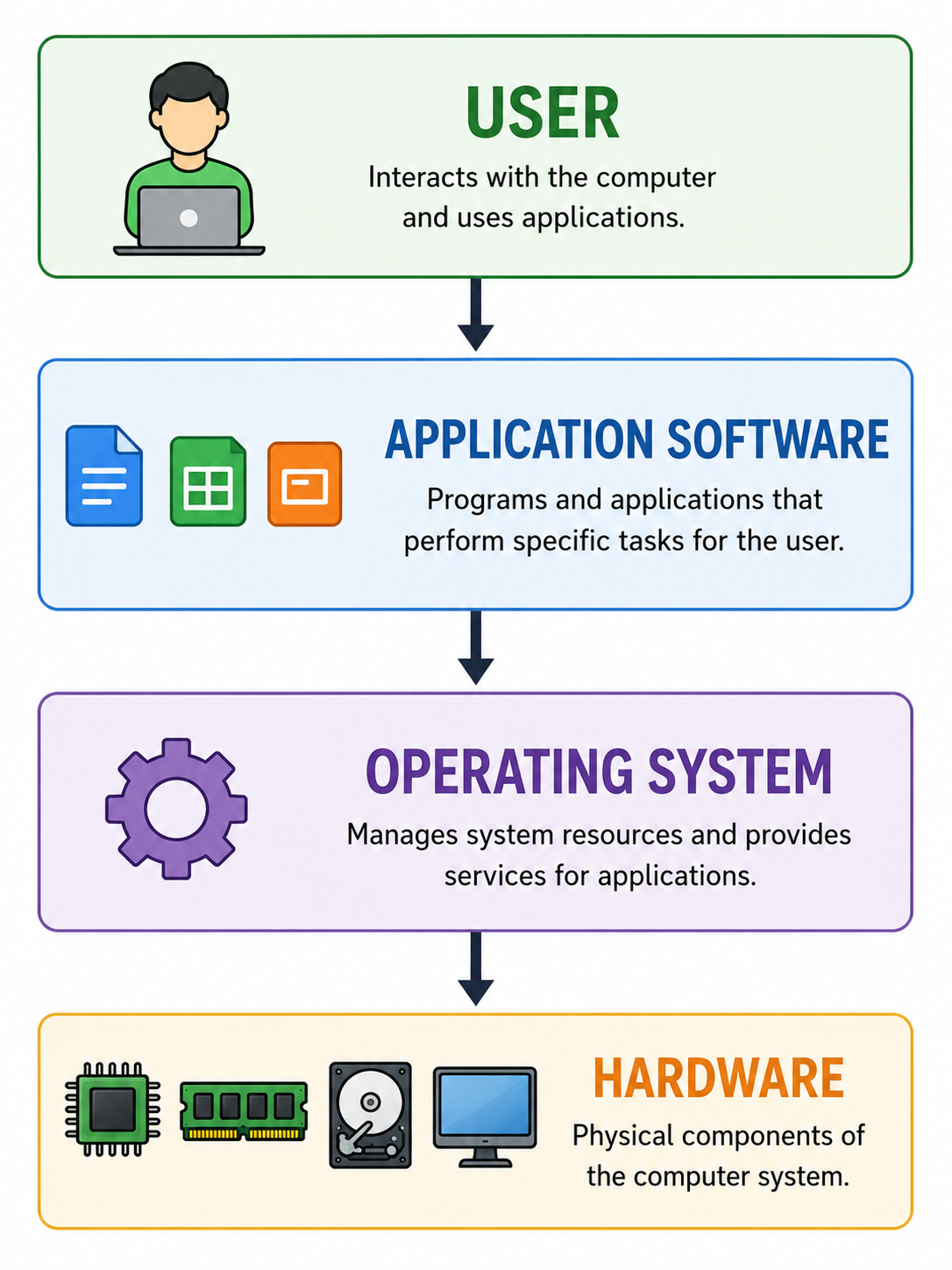
The Operating System and application software have different roles.
Operating System
Provides the platform and manages hardware resources.
Application Software
Performs specific tasks for the user.
Examples:
Word processor
Web browser
Media player
Image editor
Spreadsheet software
Relationship
Booting
Booting is the process of starting a computer and loading the Operating System into memory.
Basic Boot Process
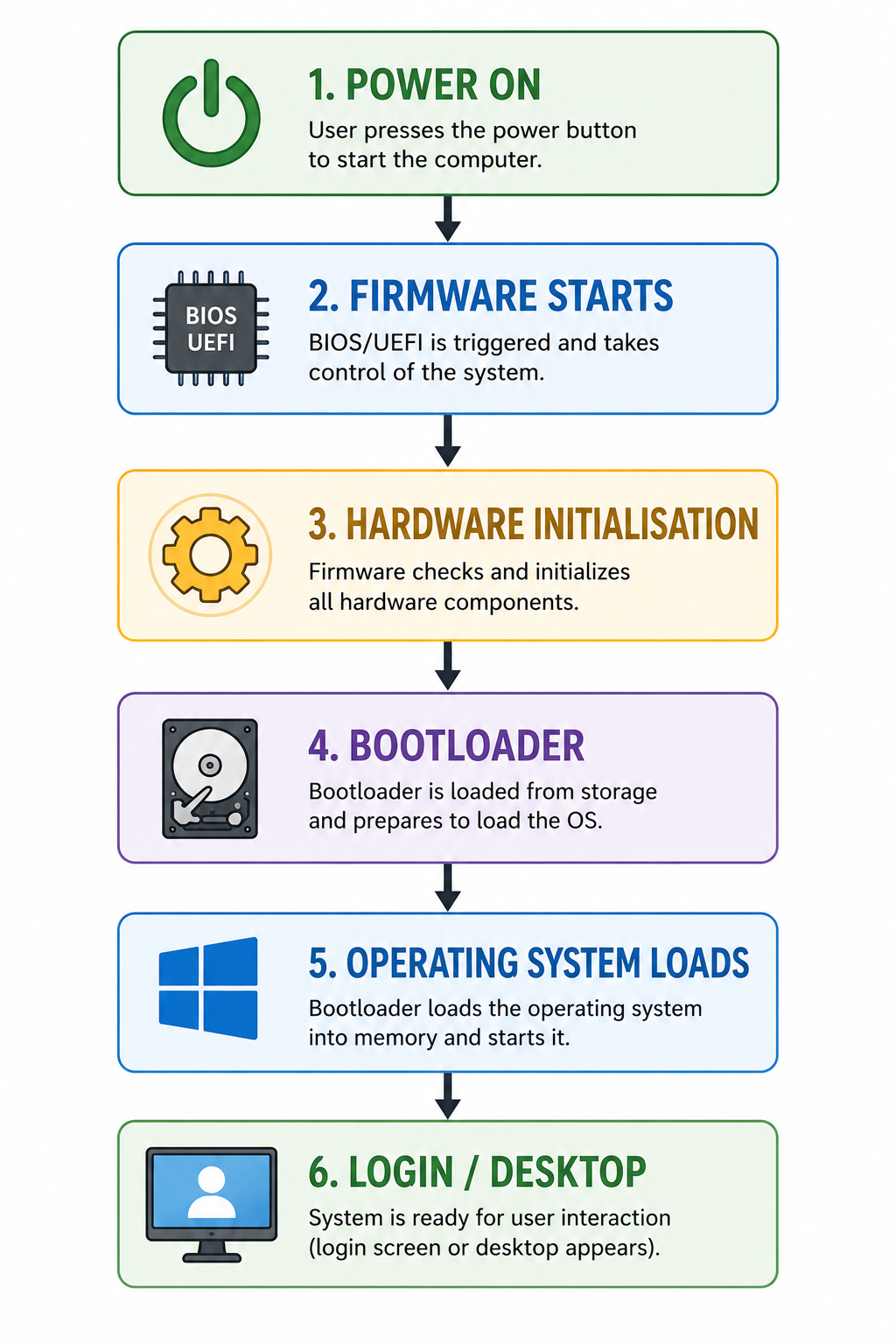
Firmware such as UEFI performs important early startup tasks before the OS is loaded.
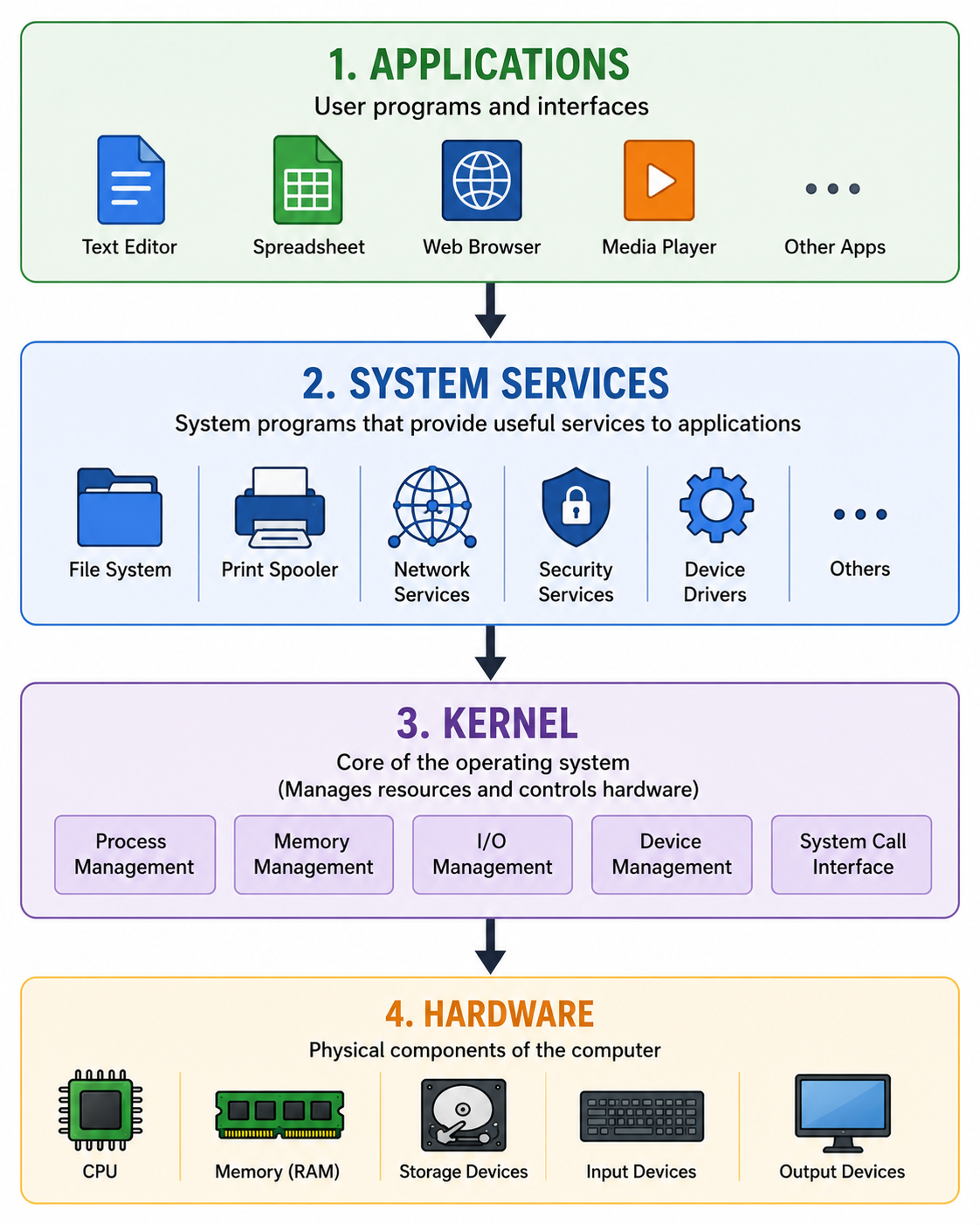
Kernel
The kernel is the core component of an Operating System.
It manages important system resources and provides fundamental services to applications.
Major responsibilities include:
CPU/process management
Memory management
Device management
System calls
Security and protection mechanisms
Simplified Structure
Device Drivers
A device driver is software that allows the Operating System to communicate with a particular hardware device.
For example:
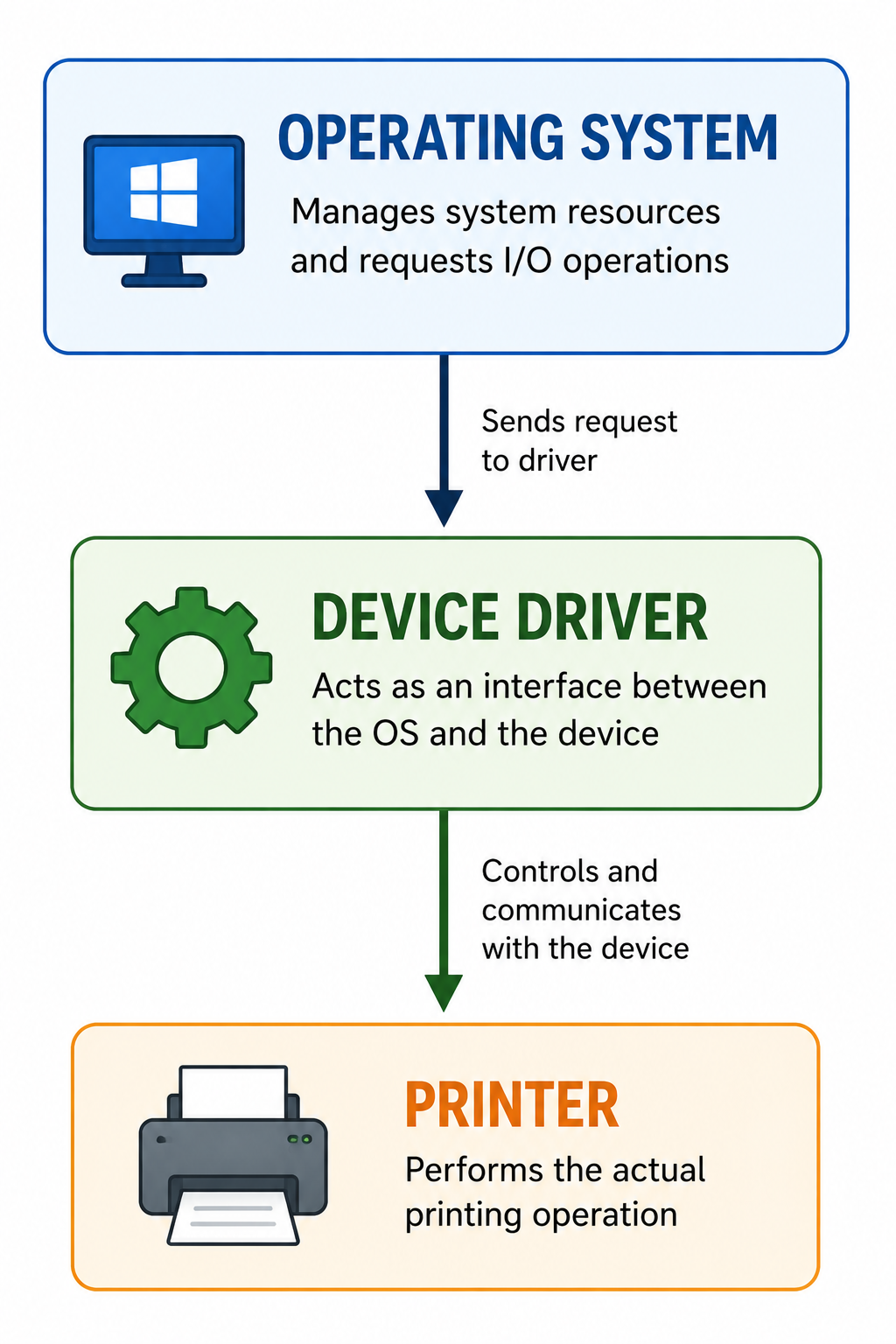
The driver translates operating-system requests into operations the device can understand.
Summary of Operating System Functions
Important Differences
Single-Tasking vs Multitasking
Single-Tasking | Multitasking |
|---|---|
One main task at a time | Multiple processes can make progress |
Limited concurrency | Supports concurrent activities |
Common in older/simple systems | Common in modern OS |
Example: MS-DOS | Windows, Linux, macOS, Android |
Single-User vs Multi-User
Single-User | Multi-User |
|---|---|
Primarily designed for one user at a time | Supports multiple users |
Common on personal devices | Common on servers |
Simpler resource-sharing scenario | Requires stronger user/resource management |
Batch vs Real-Time
Batch OS | Real-Time OS |
|---|---|
Processes jobs in batches | Responds within specified timing constraints |
User interaction is limited during processing | Timing requirements are important |
Useful for payroll and bulk processing | Useful for control systems |
Focuses on efficient job processing | Focuses on predictable timing |
Windows vs Linux
Windows | Linux |
|---|---|
Developed by Microsoft | Linux kernel developed as open source |
Proprietary OS | Many Linux distributions are open source |
Common on personal computers | Widely used on servers and also desktops |
GUI-focused for typical users | Powerful GUI and CLI environments |
Broad commercial software support | Highly configurable and customisable |
Important Exam Questions
Very Short Answer Questions
Q1. What is an Operating System?
An Operating System is system software that manages computer hardware and software resources and provides services to application programs and users.
Q2. Give two examples of Operating Systems.
Windows and Linux.
Q3. What is the main purpose of an Operating System?
Its main purpose is to manage computer resources and provide an interface and environment for users and applications.
Q4. What is a kernel?
The kernel is the core component of an Operating System responsible for managing important hardware and system resources.
Q5. What is a device driver?
A device driver is software that enables an Operating System to communicate with a hardware device.
Q6. What is multitasking?
Multitasking is the ability of an Operating System to manage multiple processes so that they can make progress during the same period.
Q7. What is a real-time operating system?
An RTOS is an Operating System designed to provide responses within specified timing constraints.
Short Answer Questions
Q1. Why is an Operating System needed?
An Operating System is needed because it manages hardware resources, provides a user interface, manages files and memory, controls processes and allows application programs to use computer hardware.
Q2. Write any five functions of an Operating System.
Five important functions are:
Process management
Memory management
File management
Device management
Security and access control
Q3. What is the difference between GUI and CLI?
GUI allows users to interact with a computer through graphical elements such as windows, icons and menus. CLI allows users to interact by typing text commands.
Q4. What is the difference between batch and real-time operating systems?
A batch system processes jobs in groups with limited interaction during processing. A real-time system is designed to respond to events within specified timing constraints.
Long Answer Questions
Q1. Explain the major functions of an Operating System.
The major functions of an Operating System include process management, memory management, file management, device management, security, resource management, storage management, networking and providing a user interface.
It allocates CPU and memory resources, manages files and devices, controls running programs and provides a secure environment for users and applications.
Q2. Explain different types of Operating Systems.
Operating Systems can be classified into several types based on their method of operation and intended use. Important types include single-user, multi-user, single-tasking, multitasking, batch, multiprocessing, multithreading, real-time, distributed, network, embedded and mobile operating systems.
Each type is designed to meet different requirements. For example, batch systems are suitable for bulk processing, real-time systems are suitable for timing-sensitive applications, and mobile operating systems are designed for smartphones and tablets.
Multiple Choice Questions
1. Which software manages computer hardware and resources?
A. Application software
B. Operating System
C. Web browser
D. Word processor
Answer: B. Operating System
2. Which is an example of an Operating System?
A. MS Word
B. Photoshop
C. Linux
D. Chrome Browser
Answer: C. Linux
3. Which OS function manages RAM?
A. File management
B. Memory management
C. Printing
D. Networking
Answer: B. Memory management
4. Which type of OS is designed for timing-sensitive applications?
A. Batch OS
B. Real-Time OS
C. Single-user OS
D. Desktop OS
Answer: B. Real-Time OS
5. Which is a mobile Operating System?
A. Android
B. Windows Server
C. DOS
D. Ubuntu Server
Answer: A. Android
6. Which component is the core of an Operating System?
A. Browser
B. Kernel
C. Printer
D. Keyboard
Answer: B. Kernel
7. Which Operating System is developed by Apple for Mac computers?
A. Linux
B. Windows
C. macOS
D. Android
Answer: C. macOS
8. Which type of OS processes jobs in groups?
A. Real-Time OS
B. Batch OS
C. Mobile OS
D. Embedded OS
Answer: B. Batch OS
49. Fill in the Blanks
________ is system software that manages computer resources.
Answer: Operating SystemThe core of an Operating System is called the ________.
Answer: Kernel________ manages the computer's main memory.
Answer: Memory management________ manages files and folders.
Answer: File management________ is a popular mobile Operating System.
Answer: Android________ is Apple's Operating System for Mac computers.
Answer: macOSAn OS designed to meet timing constraints is called a ________ Operating System.
Answer: Real-Time________ allows users to interact with a computer using graphical elements.
Answer: GUI
50. True or False
An Operating System manages computer hardware.
TrueWindows is an Operating System.
TrueRAM management is not the responsibility of an Operating System.
FalseLinux is based on the Linux kernel.
TrueAndroid is a mobile Operating System.
TrueA printer driver helps the OS communicate with a printer.
TrueA Real-Time OS simply means an OS that is always faster than other operating systems.
FalseAn Operating System can manage multiple running processes.
True
51. Quick Revision Sheet
Operating System
OS = Interface + Resource Manager + Service Provider
Main Functions
P – M – F – D – S
P → Process Management
M → Memory Management
F → File Management
D → Device Management
S → Security
Other Important Functions
Storage management
Networking
User interface
Error handling
Resource allocation
Performance monitoring
Important Types
Single-User
Multi-User
Single-Tasking
Multitasking
Batch
Multiprocessing
Multithreading
Real-Time
Distributed
Network
Embedded
Mobile
Examples
Desktop: Windows, Linux, macOS
Mobile: Android, iOS
Server: Linux, Windows Server
Embedded: Special-purpose devices
Remember:
The Operating System is the manager of the computer's resources and the bridge between applications/users and hardware.