Class 11-Introduction to Fundaments of Computer and its use
Class 11 Information Technology (802)
Unit 1: Computer Organization
Introduction to fundamentals of Computer and its use
A computer is an electronic programmable device that accepts data as input, processes it according to a set of instructions, stores it, and produces meaningful information as output.
A computer can perform millions or billions of operations in a very short time. Modern computers are used in almost every field, including education, banking, healthcare, business, communication, science, transportation and entertainment.
Basic Working of a Computer
The fundamental working of a computer can be represented as:
Input → Processing → Output
A computer may also store the data and instructions for future use.
Uses of Computers
Computers are used in almost every area of modern life.
Field | Uses of Computer |
|---|---|
Education | Online classes, examinations, presentations |
Banking | Online banking, ATM, transaction processing |
Healthcare | Patient records, diagnosis support, medical imaging |
Business | Accounting, billing, inventory management |
Communication | Email, messaging, video conferencing |
Science | Research, simulations, data analysis |
Transportation | Ticket booking, navigation, traffic management |
Entertainment | Movies, music, games |
Government | Digital records, online services |
Industry | Automation, production control, robotics |
Characteristics of a Computer
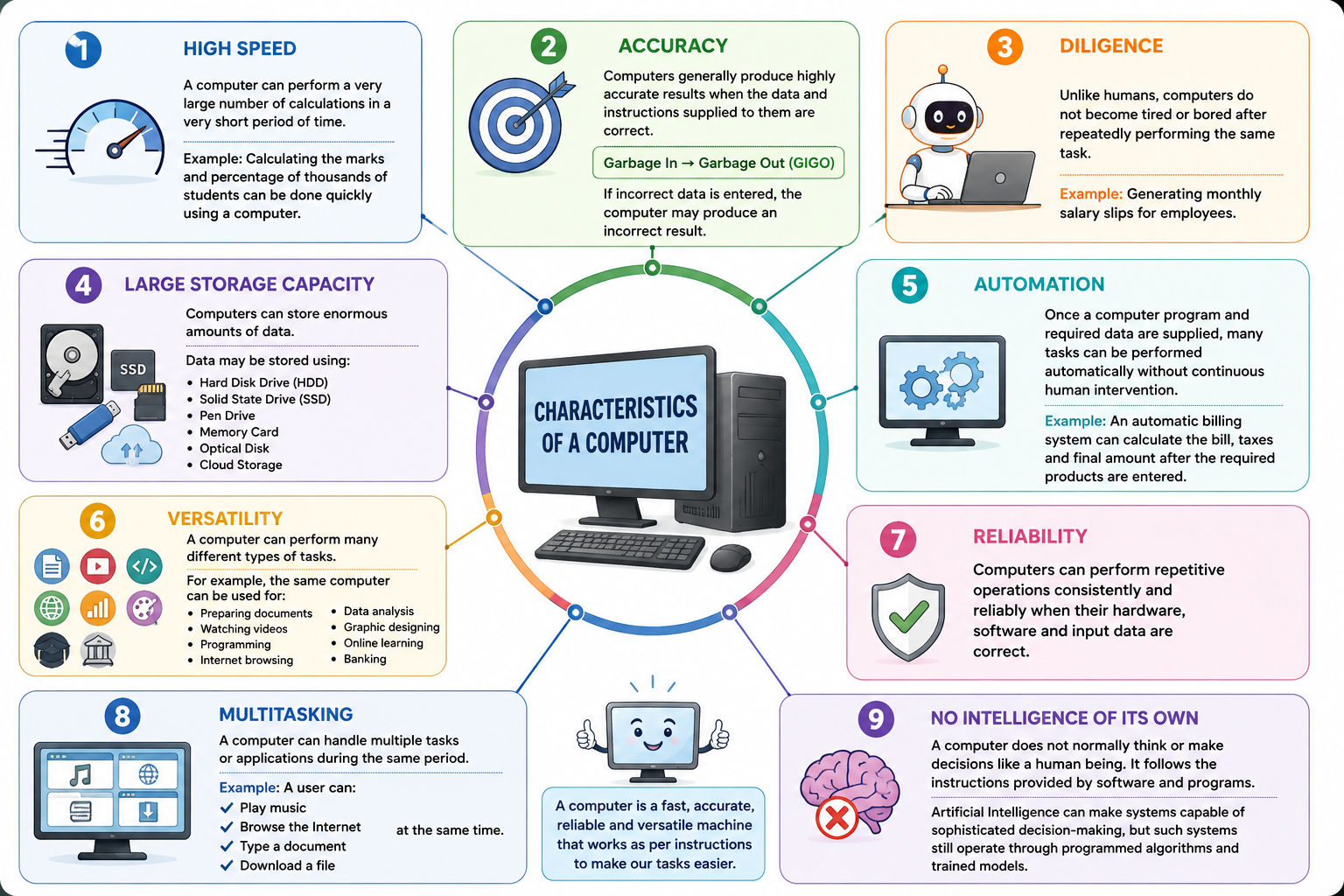
Computers have several characteristics that make them useful for performing different types of tasks.
1 High Speed
A computer can perform a very large number of calculations in a very short period of time.
For example, a computer can process thousands or millions of instructions in seconds.
Example:
Calculating the marks and percentage of thousands of students can be done quickly using a computer.
2 Accuracy
Computers generally produce highly accurate results when the data and instructions supplied to them are correct.
This is sometimes described by the principle:
Garbage In → Garbage Out (GIGO)
If incorrect data is entered, the computer may produce an incorrect result.
3 Diligence
Unlike humans, computers do not become tired or bored after repeatedly performing the same task.
A computer can perform the same operation thousands of times with consistent performance.
Example:
Generating monthly salary slips for employees.
4 Large Storage Capacity
Computers can store enormous amounts of data.
Data may be stored using:
Hard Disk Drive (HDD)
Solid State Drive (SSD)
Pen Drive
Memory Card
Optical Disk
Cloud Storage
5 Automation
Once a computer program and required data are supplied, many tasks can be performed automatically without continuous human intervention.
Example:
An automatic billing system can calculate the bill, taxes and final amount after the required products are entered.
6 Versatility
A computer can perform many different types of tasks.
For example, the same computer can be used for:
Preparing documents
Watching videos
Programming
Internet browsing
Data analysis
Graphic designing
Online learning
Banking
7 Reliability
Computers can perform repetitive operations consistently and reliably when their hardware, software and input data are correct.
8 Multitasking
A computer can handle multiple tasks or applications during the same period.
Example:
A user can:
Play music
Browse the Internet
Type a document
Download a file
at the same time.
9 No Intelligence of Its Own
A computer does not normally think or make decisions like a human being. It follows the instructions provided by software and programs.
Artificial Intelligence can make systems capable of sophisticated decision-making, but such systems still operate through programmed algorithms and trained models.
Components of a Computer
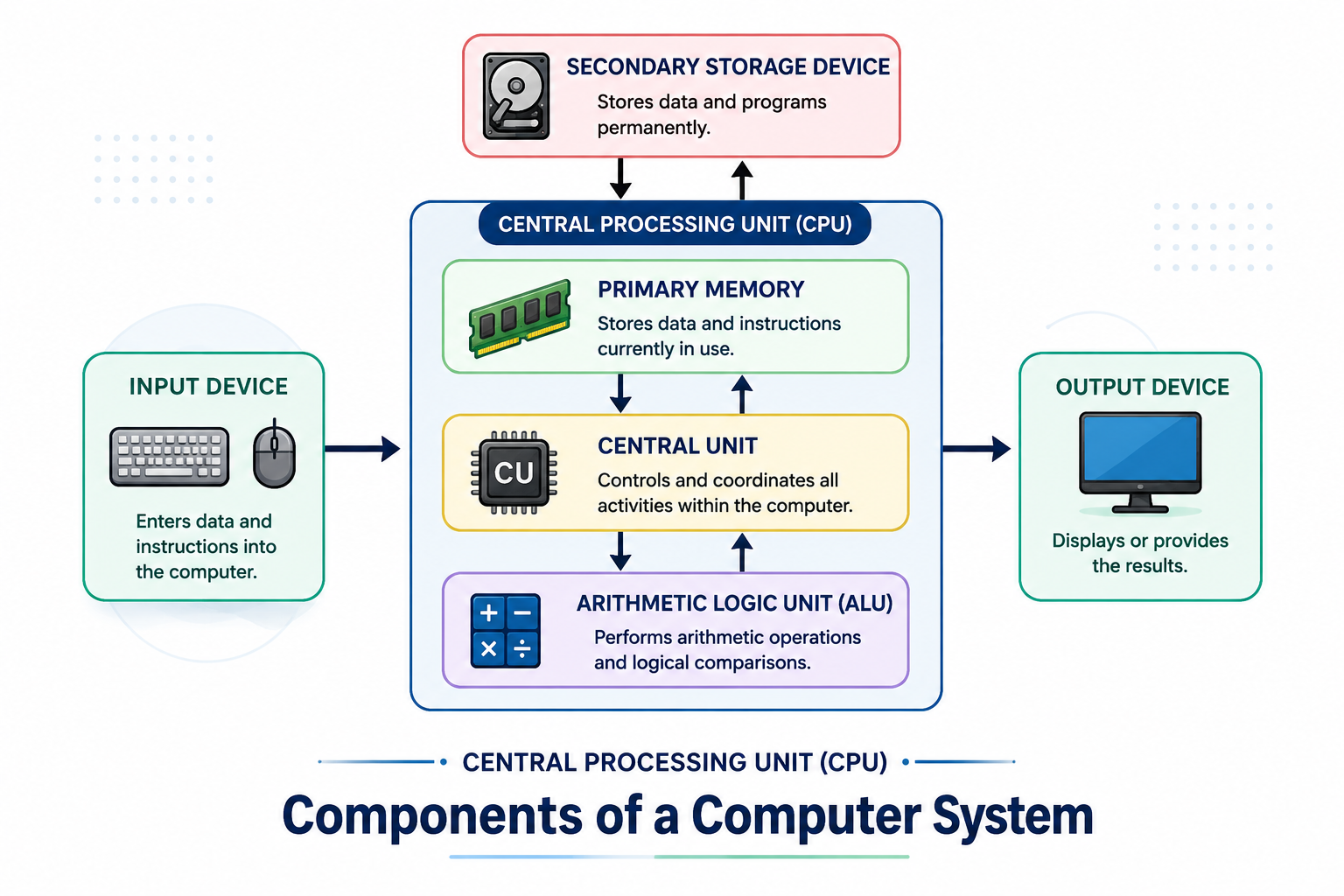
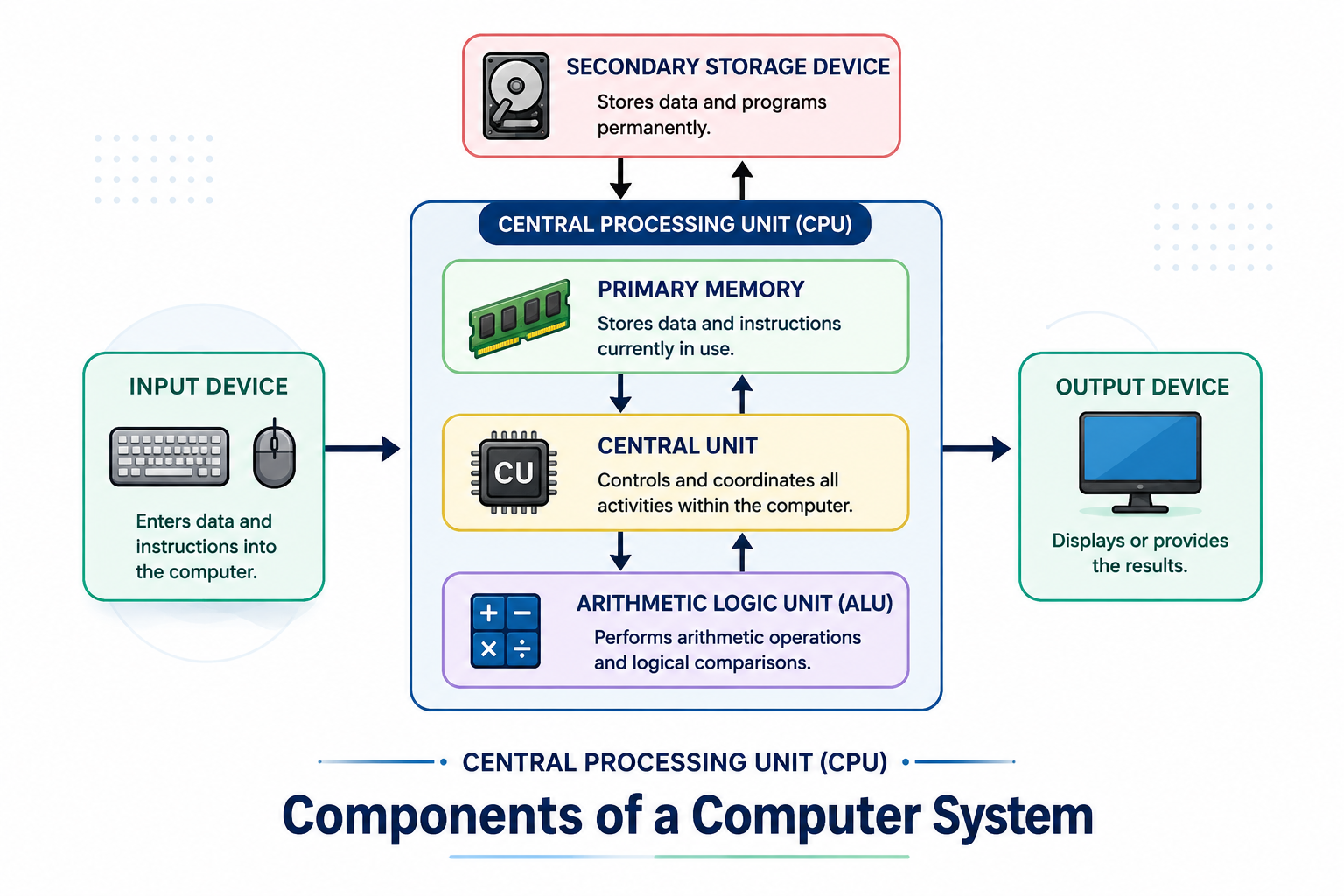
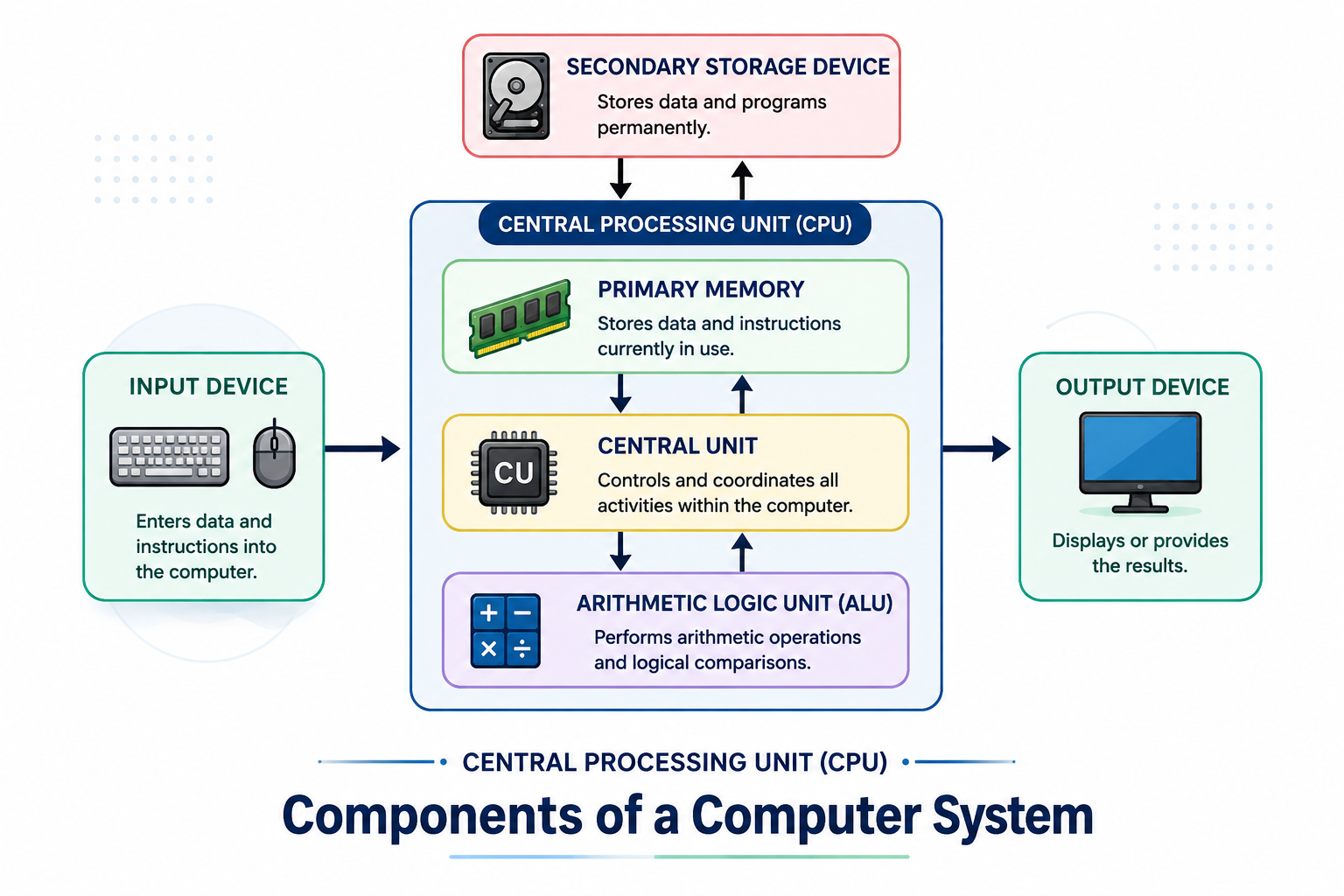
A computer system consists of several major components.
The major functional units are:
Input Unit
Central Processing Unit (CPU)
Memory/Storage Unit
Output Unit
The CPU itself contains important components such as:
Arithmetic Logic Unit (ALU)
Control Unit (CU)
Registers
1. Input Unit
The Input Unit is used to enter data and instructions into a computer.
It accepts data from the user and converts it into a form that can be processed by the computer.
Examples of Input Devices
Keyboard
Mouse
Scanner
Microphone
Webcam
Touchscreen
Barcode Reader
Joystick
Functions of Input Unit
Accepts data from the user.
Converts data into machine-readable form.
Sends the data to memory or CPU for processing.
2. Central Processing Unit (CPU)
The Central Processing Unit (CPU) is commonly called the brain of the computer because it performs processing and controls the activities of other components.
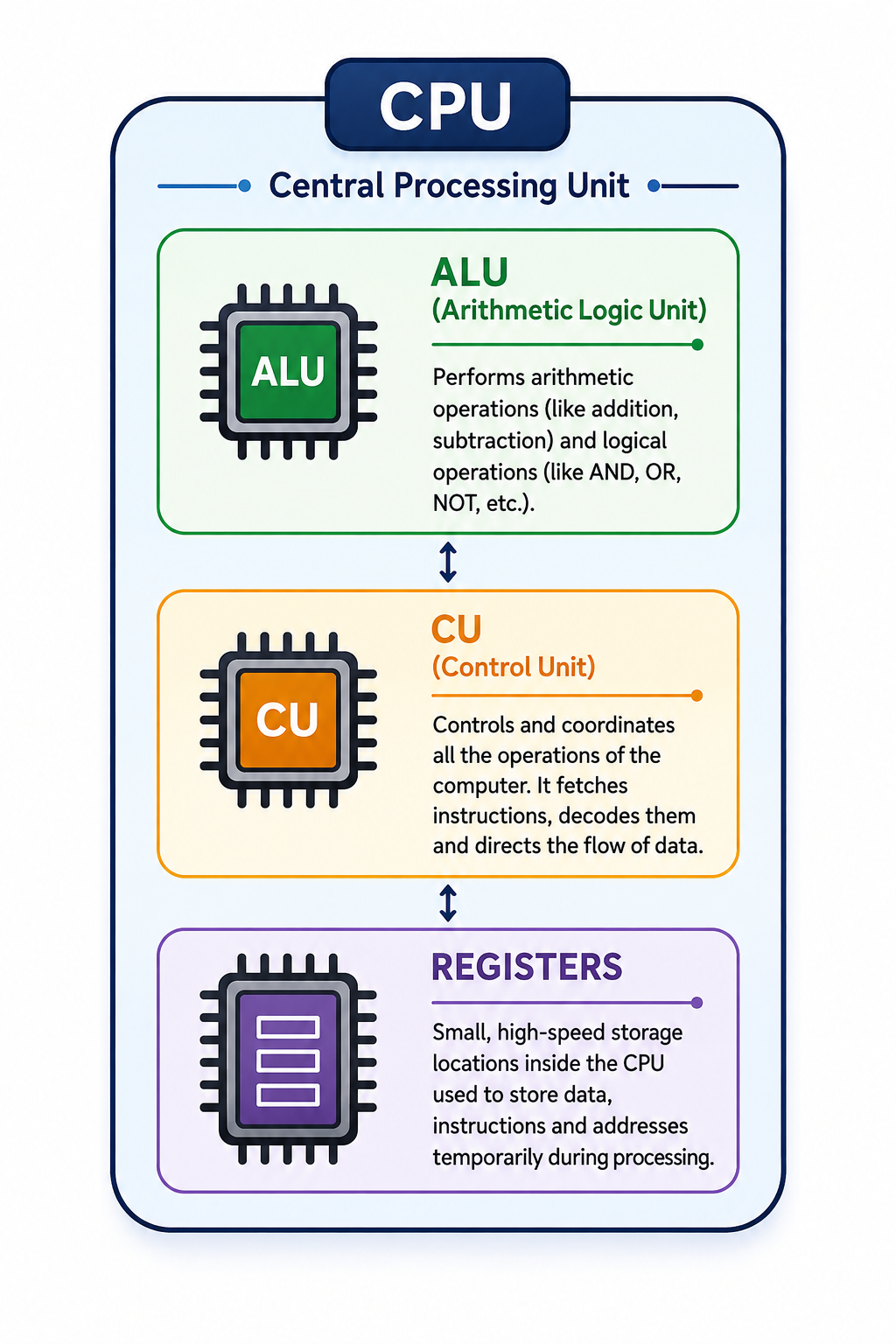
The CPU consists mainly of:
2.1. Arithmetic Logic Unit (ALU)
The Arithmetic Logic Unit (ALU) performs arithmetic and logical operations.
Arithmetic Operations
Addition
Subtraction
Multiplication
Division
Increment
Decrement
Logical Operations
Comparison
Greater than
Less than
Equal to
AND
OR
NOT
Example
Suppose:
A = 20
B = 10
The ALU can perform:
20 + 10 = 30
20 - 10 = 10
20 × 10 = 200
20 > 10 = TRUE
2.2. Control Unit (CU)
The Control Unit controls and coordinates the activities of the computer.
It does not normally perform arithmetic calculations itself. Instead, it directs other components regarding what operation should be performed and when.
Functions of Control Unit
Fetches instructions from memory.
Decodes instructions.
Controls execution of instructions.
Coordinates CPU, memory and input/output devices.
Sends control signals to various components.
The Control Unit acts like a manager or coordinator of the computer system.
2.3. Registers
Registers are very small and extremely fast storage locations inside the CPU.
They temporarily hold:
Data
Instructions
Memory addresses
Intermediate results
Registers are faster than main memory.
Examples of Registers
Depending on processor architecture, registers may include:
Program Counter (PC)
Instruction Register (IR)
Memory Address Register (MAR)
Memory Data Register (MDR)
Accumulator
General-purpose registers
3. Memory Unit
Memory is used to store data, instructions and results.
Computer memory can broadly be divided into:
Primary Memory
Primary memory is directly accessible by the CPU.
Examples:
RAM
ROM
Cache Memory
Secondary Storage
Secondary storage is used for long-term storage.
Examples:
HDD
SSD
Pen Drive
Memory Card
Optical Disk
3.1. RAM
RAM stands for Random Access Memory.
It temporarily stores programs and data currently being used by the computer.
RAM is volatile memory, which means its contents are normally lost when the power is switched off.
Example
When you open a document, the operating system loads the required data into RAM so that the CPU can work with it.
3.2. ROM
ROM stands for Read Only Memory.
It stores information that is generally retained even when the computer is switched off.
ROM is non-volatile memory.
It is commonly used for storing firmware and boot-related instructions.
3.3. Cache Memory
Cache is a small and very fast memory located close to or integrated with the CPU.
It stores frequently used data and instructions so that the CPU can access them more quickly.
A simplified hierarchy is:
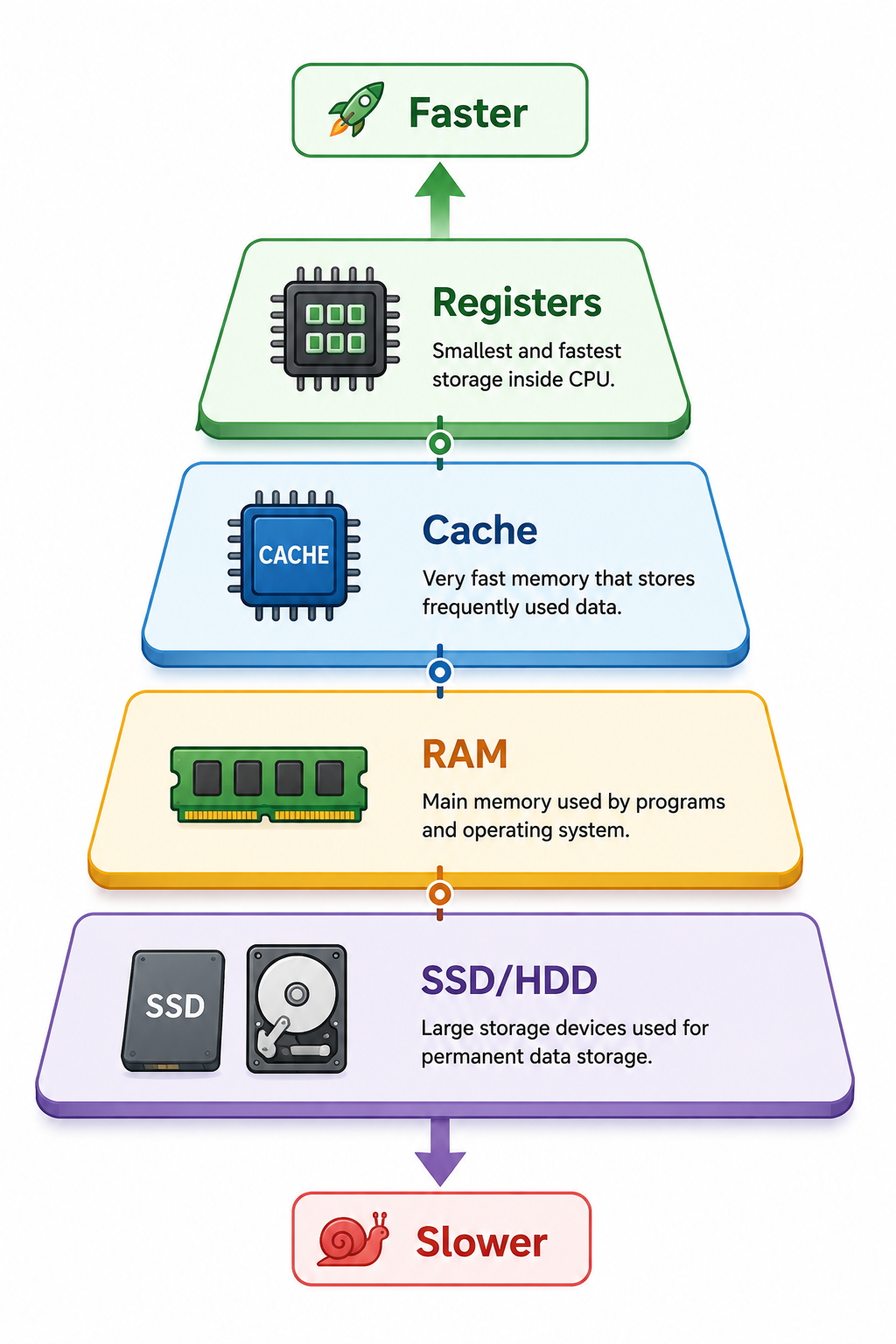
Generally, the closer the storage is to the CPU, the faster it is and the smaller its capacity tends to be.
4. Output Unit
The Output Unit presents the processed information to the user.
Examples of Output Devices
Monitor
Printer
Speakers
Projector
Headphones
Plotter
Functions
Receives processed results.
Converts them into a human-readable form.
Presents the result to the user.
Task Execution
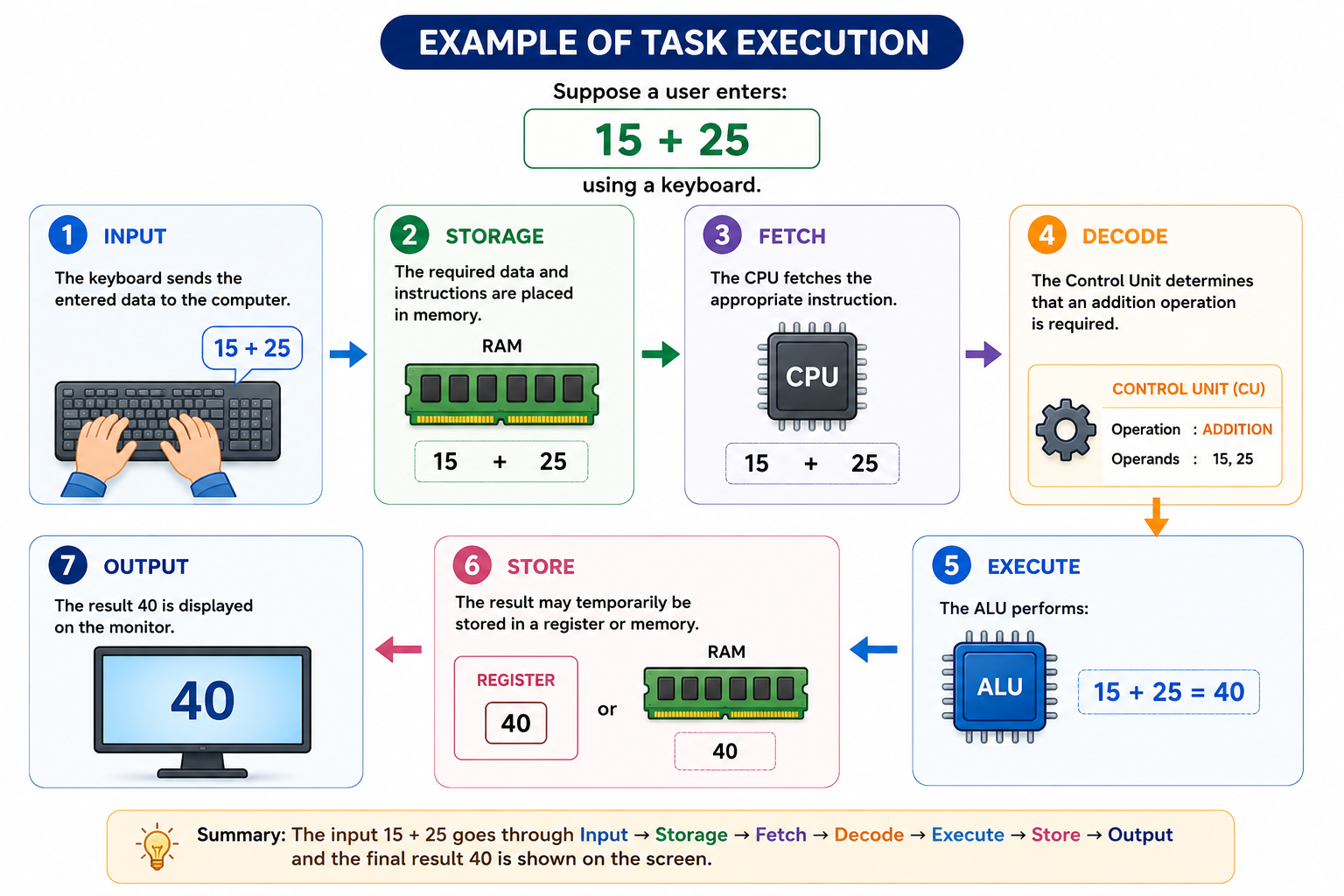
Suppose a user enters:
15 + 25
using a keyboard.
Step 1 – Input
The keyboard sends the entered data to the computer.
Step 2 – Storage
The required data and instructions are placed in memory.
Step 3 – Fetch
The CPU fetches the appropriate instruction.
Step 4 – Decode
The Control Unit determines that an addition operation is required.
Step 5 – Execute
The ALU performs:
15 + 25 = 40
Step 6 – Store
The result may temporarily be stored in a register or memory.
Step 7 – Output
The result 40 is displayed on the monitor.
Functions of Various Components
Component | Main Function |
Keyboard | Enters text and commands |
Mouse | Pointing and selection |
Scanner | Converts physical documents/images into digital form |
Microphone | Inputs sound |
Webcam | Inputs images/video |
CPU | Processes instructions and controls operations |
ALU | Performs arithmetic and logical operations |
Control Unit | Controls and coordinates operations |
Registers | Provides very fast temporary storage |
RAM | Temporarily stores active programs/data |
ROM | Stores non-volatile firmware/instructions |
Cache | Stores frequently accessed data/instructions |
HDD | Provides long-term data storage |
SSD | Provides fast long-term storage |
Monitor | Displays visual output |
Printer | Produces hard-copy output |
Speakers | Produces audio output |
CPU and Its Functions
The CPU performs several important functions.
1. Instruction Processing
The CPU reads and processes instructions provided by programs.
2. Arithmetic Operations
The ALU performs calculations such as addition, subtraction, multiplication and division.
3. Logical Operations
The CPU performs comparisons and logical operations.
4. Control
The Control Unit coordinates the activities of different computer components.
5. Data Movement
The CPU manages the movement of data between registers, memory and other components.
6. Temporary Storage
Registers provide extremely fast temporary storage during instruction execution.
Difference Between CPU, ALU and CU
Feature | CPU | ALU | CU |
Full Form | Central Processing Unit | Arithmetic Logic Unit | Control Unit |
Main Role | Overall processing and control | Performs calculations and logic | Controls and coordinates |
Performs calculations | Yes, through ALU | Yes | No |
Controls operations | Yes | No | Yes |
Location | Main processor | Inside CPU | Inside CPU |
Hardware and Software
A computer system consists of both hardware and software.
Hardware
Hardware refers to the physical components that can be seen and touched.
Examples:
Keyboard
Monitor
CPU
RAM
Mouse
Printer
SSD
Software
Software is a collection of programs and instructions that tells hardware what to do.
Examples:
Windows
Linux
Android
Microsoft Word
Web browsers
Programming applications
Relationship
          SOFTWARE
              ↓
       Gives Instructions
              ↓
          HARDWARE
              ↓
       Performs the Task
Hardware cannot perform useful tasks without appropriate software, and software requires hardware to execute.
Data and Information
Data
Data refers to raw facts and figures.
Example:
85, 72, 91, 64These values by themselves may not provide complete meaning.
Information
Information is processed and organized data that has meaning.
Example:
Average Marks = 78%Thus:
Data + Processing = Information
Important Terms
Computer
An electronic programmable device that accepts input, processes data, stores information and produces output.
CPU
The primary processing and control unit of a computer.
ALU
The part of the CPU responsible for arithmetic and logical operations.
CU
The part of the CPU responsible for controlling and coordinating operations.
RAM
Volatile primary memory used to temporarily store active data and programs.
ROM
Non-volatile memory used to store information such as firmware.
Register
Very fast storage location inside the CPU.
Input
Data supplied to a computer for processing.
Output
Processed information produced by a computer.
Storage
The process of saving data and information for future use.
Quick Revision
Remember the basic computer cycle:
Input → Process → Output → Storage
Remember the CPU components:
CPU = ALU + CU + Registers
Remember instruction execution:
Fetch → Decode → Execute → Store
Remember the major buses:
Data Bus + Address Bus + Control Bus
Important Exam Questions
Very Short Answer Questions
Q1. What is a computer?
A computer is an electronic programmable device that accepts data as input, processes it according to instructions and produces useful information as output.
Q2. What is CPU?
CPU stands for Central Processing Unit. It performs processing operations and controls the activities of a computer.
Q3. What is ALU?
ALU stands for Arithmetic Logic Unit. It performs arithmetic and logical operations.
Q4. What is CU?
CU stands for Control Unit. It controls and coordinates the activities of different components of a computer.
Q5. What is RAM?
RAM stands for Random Access Memory. It is volatile primary memory used for temporarily storing active programs and data.
Q6. What is ROM?
ROM stands for Read Only Memory. It is non-volatile memory used for storing information that needs to be retained when power is switched off.
Q7. What is a register?
A register is a small, very fast storage location inside the CPU.
Short Answer Questions
Q1. Write any five characteristics of a computer.
Five characteristics are:
High speed
Accuracy
Diligence
Large storage capacity
Versatility
Q2. What are the main functions of the Control Unit?
The Control Unit:
Fetches instructions.
Decodes instructions.
Generates control signals.
Coordinates CPU and other components.
Controls the sequence of operations.
Q3. What is the function of ALU?
The ALU performs arithmetic operations such as addition, subtraction, multiplication and division and logical operations such as comparison and Boolean operations.
Q4. Explain the Fetch–Decode–Execute cycle.
The CPU first fetches an instruction from memory, then decodes it to determine the required operation and finally executes the operation. The result may then be stored.
Long Answer Question
Explain the major components of a computer.
A computer consists of four major functional units:
Input Unit:
Accepts data and instructions from the user.
Memory Unit:
Stores data, instructions and intermediate/final results.
CPU:
Processes instructions and controls computer operations. It consists mainly of ALU, Control Unit and registers.
Output Unit:
Presents processed information to the user through devices such as monitors, printers and speakers.
One-Minute Revision Sheet
COMPUTER
   │
   ├── INPUT
   │     ├── Keyboard
   │     ├── Mouse
   │     └── Scanner
   │
   ├── PROCESSING
   │     └── CPU
   │          ├── ALU
   │          ├── CU
   │          └── Registers
   │
   ├── MEMORY
   │     ├── RAM
   │     ├── ROM
   │     └── Cache
   │
   └── OUTPUT
         ├── Monitor
         ├── Printer
         └── Speakers
Remember:
IPO:
Input → Process → Output
CPU:
ALU + CU + Registers
Instruction Cycle:
Fetch → Decode → Execute → Store
Three Main Buses:
Data → Address → Control
Key Takeaways
A computer accepts input, processes it and produces output.
Computers are fast, accurate, diligent, versatile and capable of storing large amounts of data.
The CPU is responsible for processing and controlling operations.
ALU performs arithmetic and logical operations.
CU controls and coordinates computer operations.
Registers provide very fast temporary storage.
RAM is volatile memory.
ROM is non-volatile memory.
Input devices provide data to the computer.
Output devices present processed information.
The Fetch–Decode–Execute cycle is fundamental to instruction processing.
Data becomes useful information after processing.