How to Geotag a Photo Online (Add GPS Location, Latitude & Longitude)
Geotagging a photo means adding GPS location details such as latitude, longitude, and date directly to an image. This is often required for government job applications like UPSC, SSC, or other official submissions where proof of location is needed.
Earlier, people had to rely on mobile apps or special cameras to add location data to images. However, with modern web tools, you can now geotag photos online in just a few seconds — without installing any app or giving unnecessary permissions.
In this guide, you will learn what geotagging is, why it is important, and how to geotag a photo online step by step.
What is Geotagging?
Geotagging is the process of embedding geographical information into a photo. This information is stored within the image file and can be used to identify where and when the photo was taken.
Geotagging typically includes:
Latitude and longitude coordinates
Location name (optional)
Date and time of capture
Map-based positioning
This data is often stored in the image’s EXIF metadata or added visually as a layer on the photo.
Why is Geotagging Important?
Geotagging is becoming increasingly important in both official and personal use cases. Many organizations now require location-based proof to ensure authenticity and transparency.
Common use cases include:
Government job applications (UPSC, SSC, State exams)
Fieldwork documentation
Property verification and surveys
Work reporting with location proof
Construction and site progress tracking
For example, if you are applying for a government position that requires field verification, you may need to upload geotagged photos as proof of presence at a specific location.
Steps to Geotag a Photo Online
Follow these simple steps to geotag your photo online:
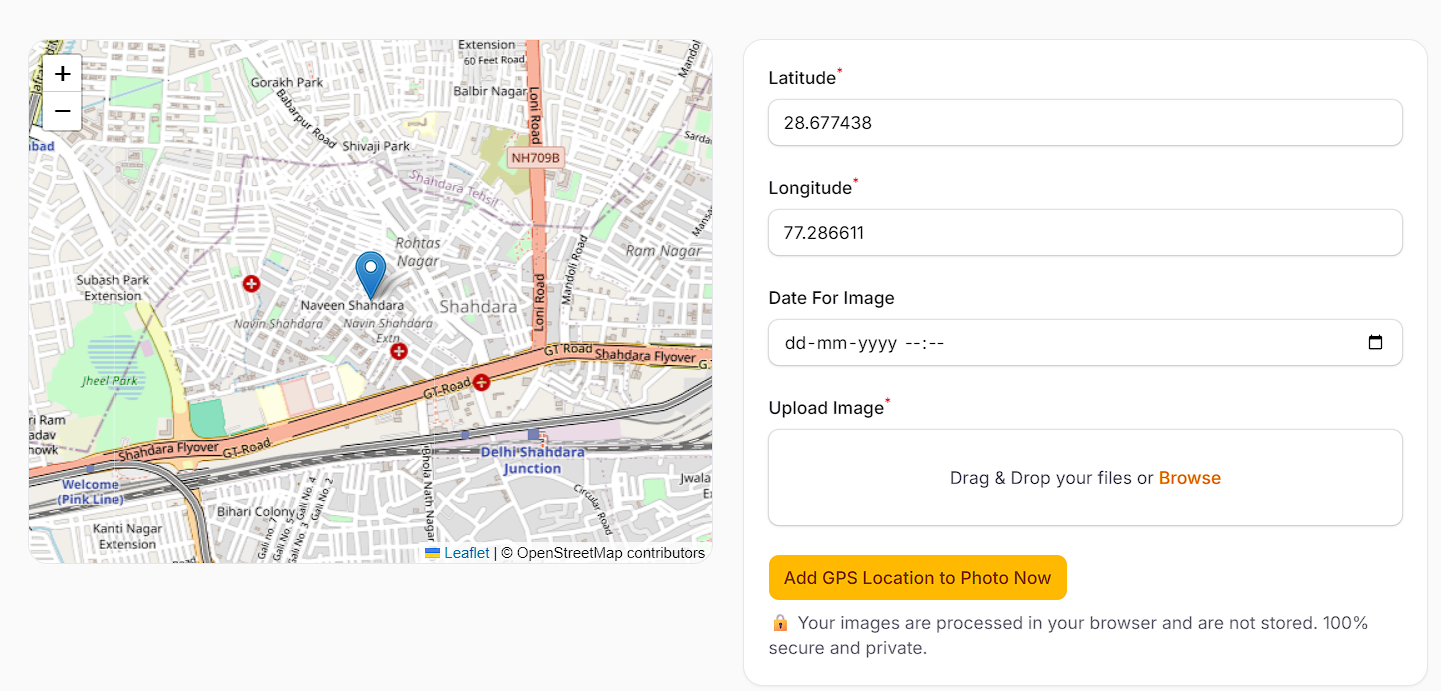
Go to https://edvida.in
Click on Geo Tag Image from the top menu
Allow location permission when prompted by your browser
The tool will automatically detect your current location and fill in latitude and longitude
Upload the image you want to geotag
Click on Add GPS Location to Photo Now
Download your geotagged image with location details
The entire process takes less than a minute and does not require any technical knowledge.
Features of the Online Geotagging Tool
Using an online tool offers several advantages over traditional methods. Here are some key features:
Automatic GPS location detection using your device
Accurate latitude and longitude tagging
Option to modify date and time before downloading
No need to install any app
Works directly in your browser
Compatible with both mobile and desktop devices
Fast processing with instant results
These features make it a convenient and efficient solution for anyone needing geotagged images quickly.
Benefits of Using an Online Geotagging Tool
There are several benefits of using an online geotagging tool instead of mobile apps:
1. No Installation Required
You don’t need to download or install any application. This saves storage space and keeps your device clutter-free.
2. Better Privacy
Many apps ask for unnecessary permissions like camera access, storage access, or background tracking. Online tools only require location access when needed.
3. Easy to Use
The interface is simple and user-friendly. Even beginners can geotag images without any confusion.
4. Cross-Device Compatibility
You can use the tool on any device — mobile, tablet, or desktop — without any issues.
5. Fast Processing
The entire process is completed within seconds, making it ideal for urgent submissions.
Tips for Accurate Geotagging
To ensure your geotagged photos are accurate and accepted for official use, follow these tips:
Enable location services (GPS) on your device
Allow browser permission when prompted
Ensure a stable internet connection
Double-check the location on the map before applying
Verify latitude and longitude values if required
Use clear and high-quality images
These small steps can help you avoid errors and ensure your photo meets all requirements.
Common Mistakes to Avoid
While geotagging is simple, users often make a few common mistakes:
Denying location permission, which prevents automatic detection
Uploading incorrect or unrelated images
Not checking the location before downloading
Using outdated or low-quality images
Forgetting to update the date if required
Avoiding these mistakes will ensure a smooth experience and accurate results.
FAQs
Can I geotag a photo without GPS?
Yes, if GPS is not available, you can manually enter latitude and longitude values in some tools.
Is geotagging required for government jobs?
Yes, many government applications require geotagged images as proof of location and authenticity.
Is it safe to use an online geotagging tool?
Yes, as long as the tool does not request unnecessary permissions and processes images securely.
Can I use this tool on mobile?
Yes, the tool works perfectly on both mobile and desktop browsers.
Does geotagging affect image quality?
No, geotagging does not reduce image quality. It only adds location information to the image.
Conclusion
Geotagging a photo online is one of the easiest ways to add GPS location, latitude, and longitude to your images. With just a few clicks, you can create accurate, location-based photos without installing any app.
Whether you need geotagged images for government applications, fieldwork, or personal use, an online tool provides a fast, secure, and reliable solution.
Start geotagging your photos today and save time while ensuring accuracy and compliance.